Why Is My Microwave Turntable Not Spinning? Causes and Fixes
Your microwave can still heat food when the turntable stops moving — but that doesn’t mean the problem should be ignored. Learn the most common causes, safe fixes you can try, and when to call a local repair technician.

Why Is My Microwave Turntable Not Spinning? Causes and Fixes
A microwave can still heat food when its turntable stops moving. That does not mean the turntable problem should be ignored.
If your microwave turntable not spinning, start with the simple causes. The plate may be installed incorrectly. Food debris may block the roller track. The turntable function may also be switched off.
More serious problems can involve the coupler, support, shaft, or motor. The good news is that many turntable problems are easy to identify — and you usually do not need to open the microwave cabinet.
Manufacturers such as Whirlpool, KitchenAid, and Bosch recommend checking the plate, support, rollers, installation, and turntable settings first.
If you live in Bend, Oregon, this problem can show up in countertop, built-in, and over-the-range microwaves. Whether you are near the Old Mill District, along 3rd Street, or closer to Cascade Village, the basic troubleshooting steps remain similar.
📋 Table of Contents — Tap to Jump to a Section
- 01 Introduction
- 02 Why Is It Not Spinning?
- 03 How It Works
- 04 8 Common Causes
- 05 Plate Not Installed
- 06 Food Debris
- 07 Roller Ring
- 08 Turntable Setting
- 09 Coupler Damage
- 10 Support / Shaft
- 11 Motor Failing
- 12 Motor Failed
- 13 How to Fix It
- 14 Diagnose by Symptom
- 15 Heating but Not Spinning
- 16 Can You Still Use It?
- 17 Motor Replacement
- 18 DIY or Pro?
- 19 Prevention
- 20 When to Call
- 21 Facts and Figures
- 22 FAQ
- 23 Bend Repair
Why Is My Microwave Turntable Not Spinning?
The most common causes include:
- The microwave turntable plate is not seated correctly.
- Food or debris is blocking the roller track.
- The roller ring or guide is damaged.
- The turntable function is turned off.
- The microwave turntable coupler is damaged.
- The turntable support or shaft is damaged.
- The microwave turntable motor is wearing out.
- The motor has failed completely.
Start with the easiest checks first.
Safety first: Do not remove the microwave’s outer cabinet to diagnose the problem. Microwaves contain high-voltage components that can remain hazardous.
What Normal Turntable Operation Looks Like
For most standard cooking cycles, the turntable should rotate when the model uses a rotating design. Some models allow the turntable to be switched off for oversized dishes, and some turntables can rotate in either direction — both can be normal.
Check your owner’s manual before assuming the motor has failed.
Why Is My Microwave Turntable Not Spinning?
Common causes include incorrect plate installation, food debris in the roller track, a misaligned roller ring, a disabled turntable setting, or a damaged coupler, support, or motor. Start with the easiest checks before considering component replacement.
How Does a Microwave Turntable Work?
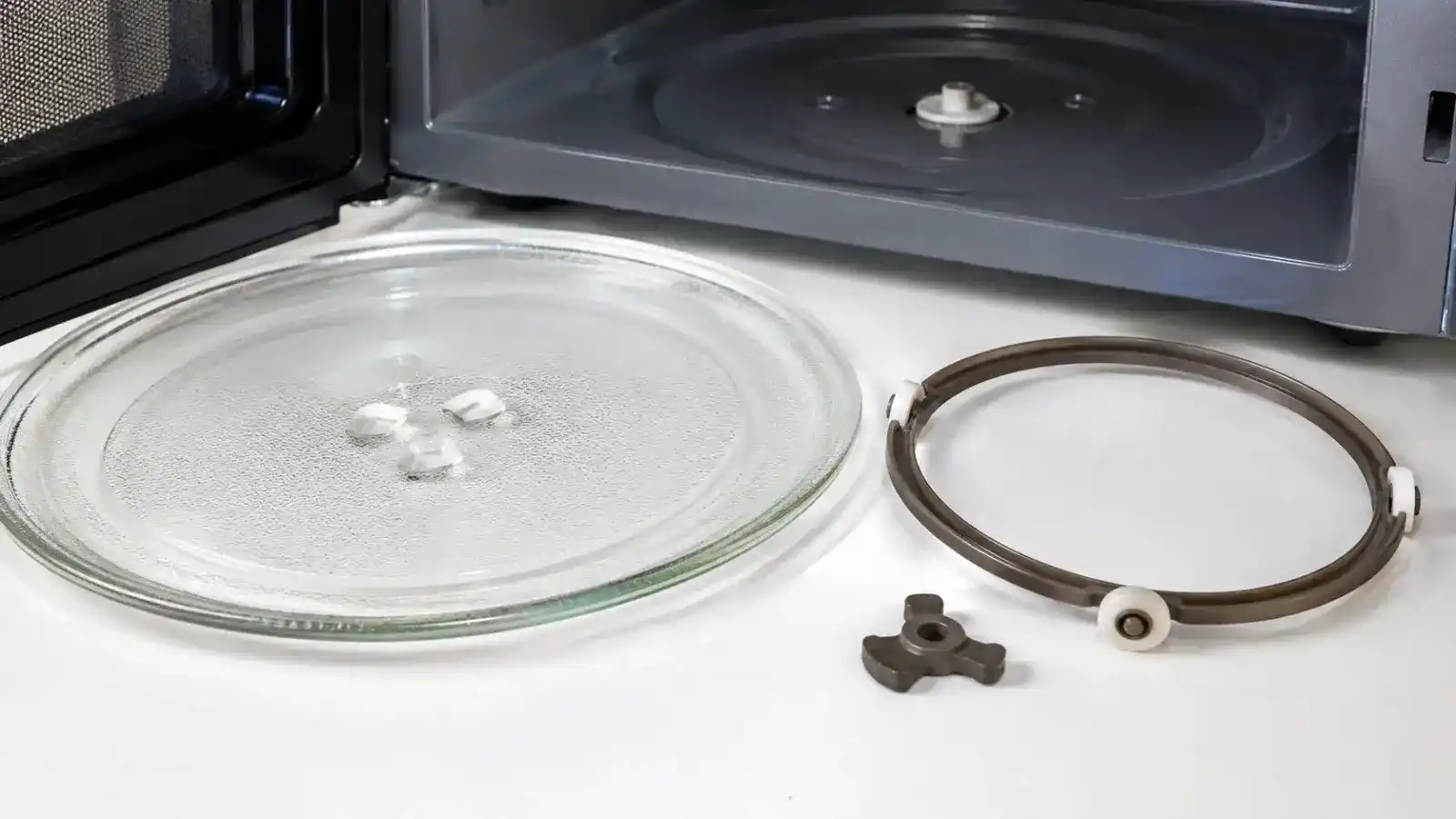
A microwave turntable system has several simple parts. The glass plate sits on a roller support. The center of the plate connects with a hub or coupler. A small drive motor turns that system.
As the plate rotates, food moves through different areas of the microwave cavity. This helps promote more even heating. Whirlpool explains that a rotating turntable helps reduce uneven heating and hot or cold spots.
Some models also allow the turntable function to be switched off. This feature can help when cooking larger dishes. KitchenAid also notes that some turntables can rotate in either direction — that change in direction can be normal.
What Makes the Microwave Plate Rotate?
The microwave turntable motor provides the movement. The motor transfers rotation through the drive shaft or coupler. The coupler engages with the underside of the glass plate. The roller ring supports the plate while it moves. A problem with any of these parts can stop rotation.
What Does the Roller Ring Do?
The roller ring sits under the glass plate. Small wheels help the plate move around the microwave’s track. If one wheel sticks, breaks, or becomes blocked, the plate may wobble. You may also hear a clicking, grinding, or thumping sound. KitchenAid says improper installation or a support roller problem can cause thumping or rumbling noises.
Does a Microwave Turntable Need to Spin?
For most standard cooking cycles, the turntable should operate when the model uses a rotating design. However, some microwaves have a turntable-off feature. That means a stationary plate does not always indicate a mechanical failure. Check your owner’s manual before assuming the motor has failed.

| Component | What It Does | What Can Go Wrong |
|---|---|---|
| Glass turntable plate | Holds food and rotates it | Installed incorrectly or sits unevenly |
| Roller ring / guide | Supports the plate on small wheels | Misaligned, stuck, or broken wheels |
| Coupler / hub | Connects the plate to the drive | Cracks or wears, causing slipping |
| Support / drive shaft | Transfers motor rotation, keeps plate aligned | Damaged, so the plate wobbles or stops |
| Turntable motor | Provides the rotation | Wears out or fails completely |
| Turntable setting | Enables or disables rotation | Accidentally switched off |
Understanding these components gives you a better starting point. It also helps explain why a plate that looks fine can still refuse to rotate.
What Causes a Microwave Turntable to Stop Spinning?
The following eight causes cover both simple installation problems and deeper mechanical failures. Start with the simple possibilities before moving toward motor diagnosis.
| Common Cause | Main Symptom | What to Check |
|---|---|---|
| Plate not installed correctly | Plate wobbles or won’t rotate | Plate seating and center hub |
| Food or debris in track | Plate sticks or moves unevenly | Roller track and cavity floor |
| Roller ring misaligned | Uneven spinning, thumping | Roller support and wheels |
| Turntable function off | Heats normally, plate never moves | Control panel setting |
| Damaged coupler | Plate slips or won’t catch | Center connection under plate |
| Damaged support or shaft | Wobbling or stopped plate | Center support alignment |
| Motor wearing out | Slow, intermittent rotation | Clean track, observe movement |
| Motor failed | Plate never moves during cook cycle | Motor testing by a technician |
1. The Microwave Turntable Plate Is Not Installed Correctly
This is one of the first things to check. Remove the glass plate and inspect the center connection. Then check the support underneath.
The plate should sit securely on the support and connect correctly with the center hub. A plate that sits unevenly may wobble or refuse to rotate.
Whirlpool recommends checking that the turntable sits correctly on its support.
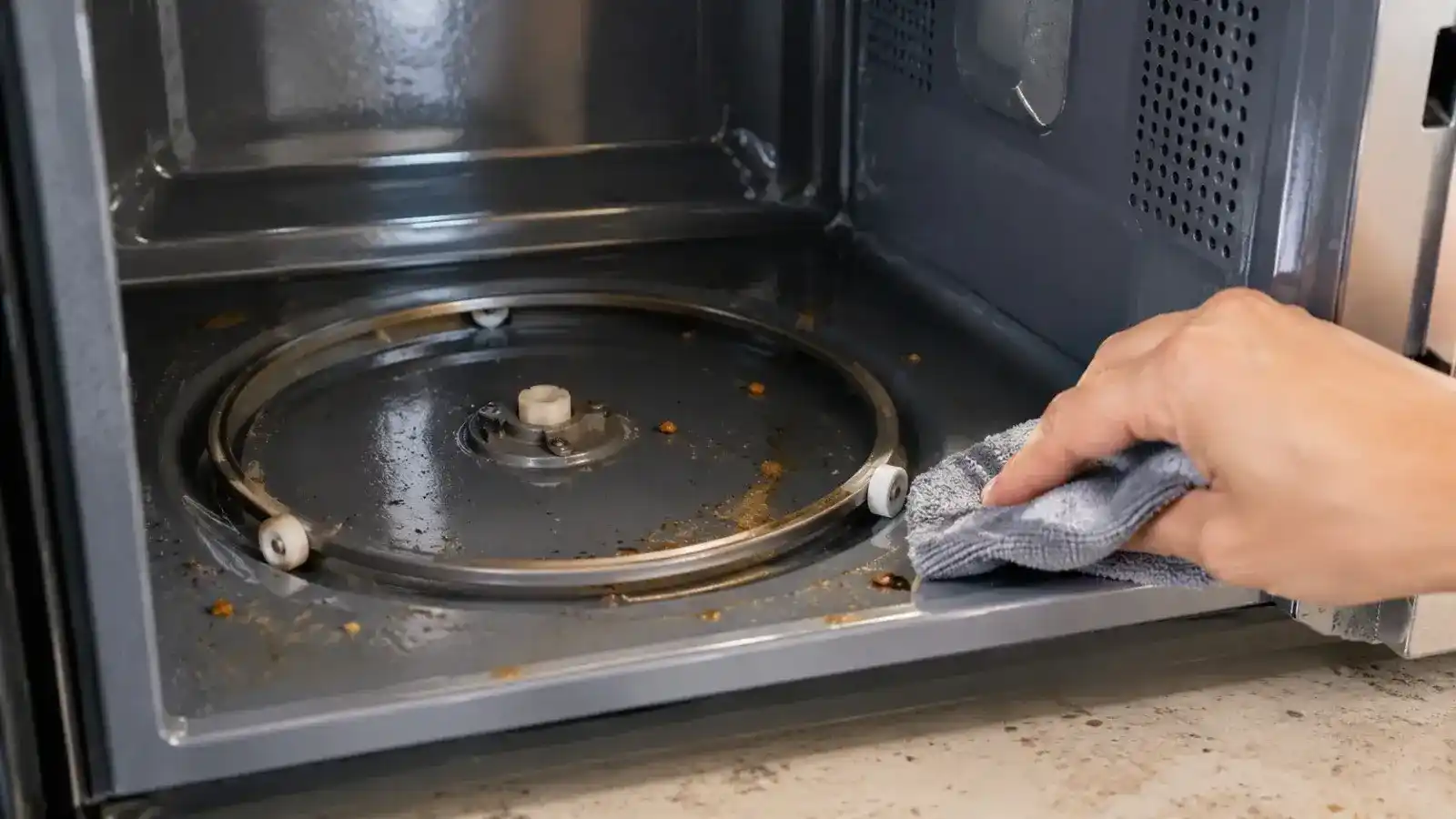
2. Food or Debris Is Blocking the Turntable Track
Small pieces of food can collect beneath the plate. Grease can also build up around the roller wheels. That buildup creates resistance.
Remove the plate and clean the cavity floor. Clean the roller ring as well. Bosch specifically recommends checking for food debris or objects blocking turntable movement.
This simple step can sometimes restore normal rotation.
3. The Roller Ring or Guide Is Misaligned
The roller ring must sit correctly in its track. If it shifts, the plate may spin unevenly.
Look for cracked plastic, bent sections, stuck wheels, or excessive wear. Turn each wheel by hand while the support is outside the microwave. The wheels should move freely.
4. The Turntable Function Is Turned Off
Some microwaves let you disable rotation. This feature can help when using oversized cookware.
If the microwave heats normally but the plate never moves, check the control panel. Look for a Turntable, Turntable On/Off, or similar setting. KitchenAid and Whirlpool both document models with this feature.
5. The Microwave Turntable Coupler Is Damaged
The coupler connects the drive system to the glass plate. It can crack or wear over time.
The plate may then sit correctly but fail to receive enough movement from the motor. A damaged coupler can also cause slipping.
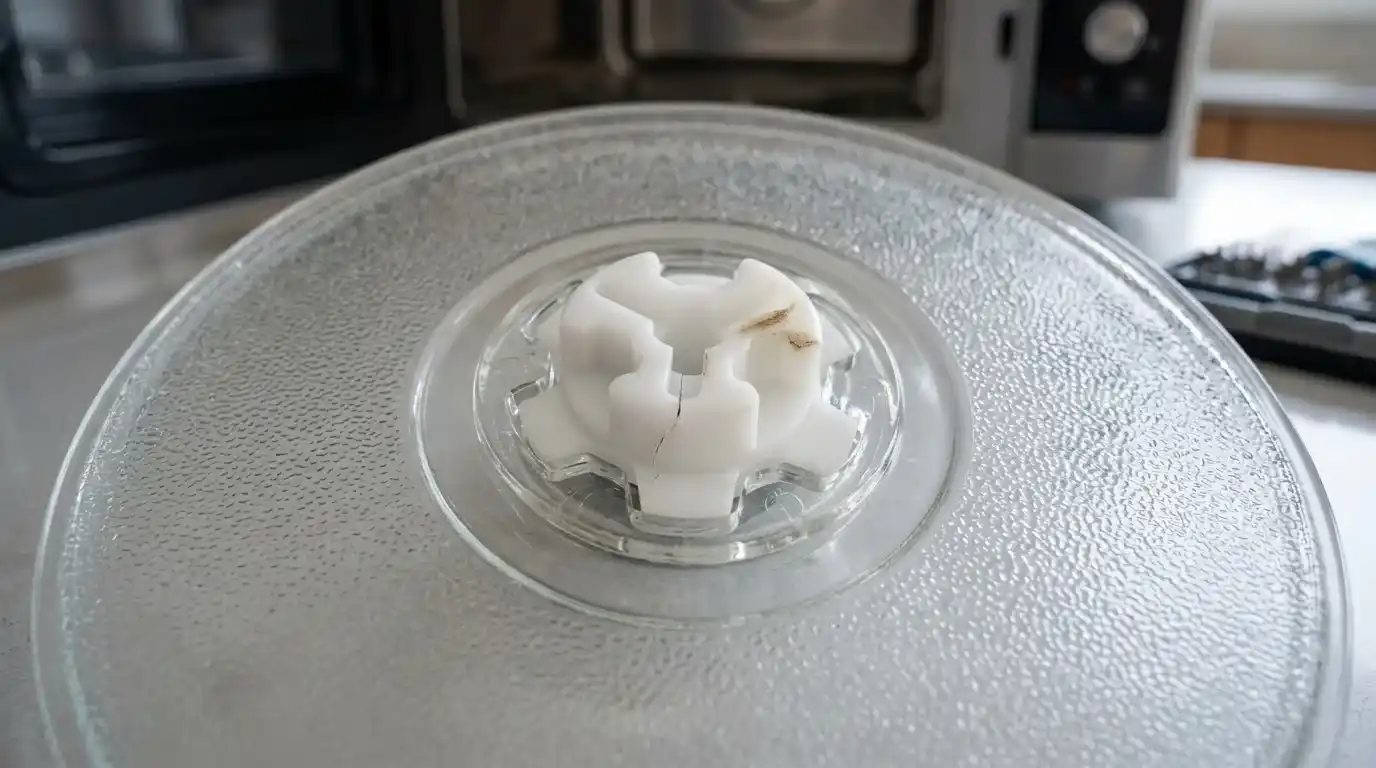
6. The Turntable Support or Shaft Is Damaged
The center support helps keep the plate aligned. A damaged support can make the plate wobble or stop.
The shaft can also wear or become damaged. Do not force the plate if the center connection looks broken.
7. The Microwave Turntable Motor Is Failing
The motor can wear gradually. You may notice slower rotation before it stops completely. The plate might also start moving and then stop.
Grinding or buzzing can also point toward a mechanical problem. At this stage, microwave turntable repair may require component testing.
8. The Turntable Motor Has Failed Completely
A failed motor will not rotate the plate during a normal cook cycle. The microwave may still produce heat. That can make the problem confusing.
If installation, cleaning, settings, and the coupler all check out, the motor becomes a stronger suspect.
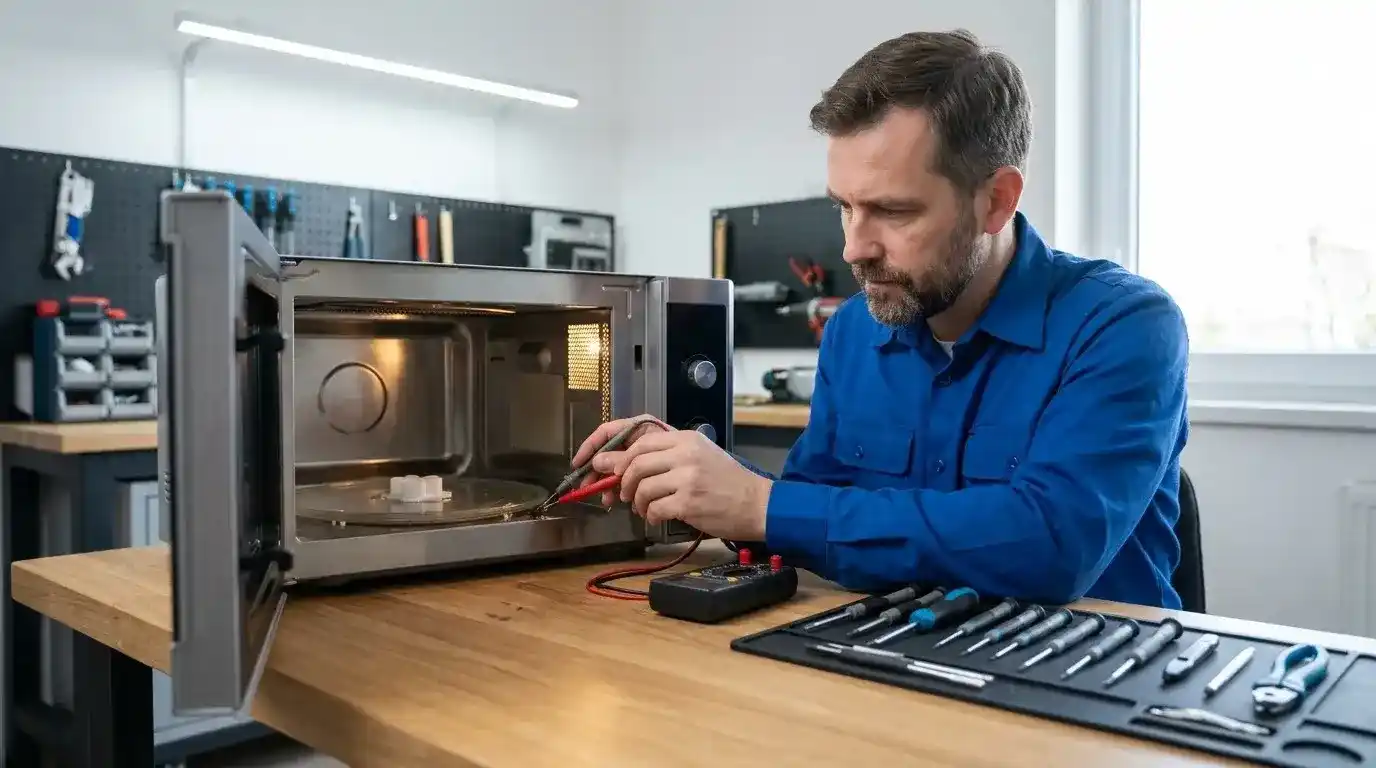
How to Fix a Microwave Turntable That Is Not Spinning
Work through these steps in order.
1. Turn Off the Microwave and Remove the Plate
Stop the cooking cycle first. Allow the interior to cool. Remove the glass plate and roller support.
2. Reinstall the Microwave Turntable Plate
Clean the underside of the plate. Check the center opening. Place the roller support correctly on the cavity floor. Then position the plate on top. Make sure it sits firmly.
3. Clean the Roller Ring and Track
Remove crumbs, grease, and other debris. Clean around the wheels. Check that each wheel moves freely. A blocked roller track can create enough resistance to prevent rotation.
4. Inspect the Turntable Coupler
Look at the center connection under the plate. Check for cracks or obvious damage. Do not force a damaged component into place.
5. Check the Turntable Setting
Look through the microwave controls or owner’s manual. Make sure rotation has not been disabled. This check takes less than a minute on many models.
6. Test the Microwave Using a Cook Cycle
Place the turntable back correctly. Put a microwave-safe cup containing water on the plate. Run a short cooking cycle. Watch the plate through the door. Do not run the microwave empty. KitchenAid uses a water-cup test when checking turntable operation after cleaning the support assembly.
7. Check Whether the Turntable Motor Needs Replacement
If everything looks correct but the plate still does not move, the motor may need testing. Motor replacement is more involved than cleaning the roller track. A qualified technician should handle internal microwave repairs.
Microwave Turntable Troubleshooting by Symptom
Different symptoms can point toward different causes. This table is useful because the same symptom can have different causes — start with the easiest explanation before replacing parts.
| What You Notice | Possible Cause | What to Check First |
|---|---|---|
| Plate does not move at all | Setting, coupler, motor, obstruction | Turntable setting and plate installation |
| Plate spins unevenly | Roller ring, wheels, alignment | Roller support and track |
| Grinding or thumping | Roller assembly, plate, coupler | Remove plate and inspect support |
| Plate starts, then stops | Motor or mechanical resistance | Clean track and observe movement |
| Plate slips | Damaged coupler or support | Center connection under plate |
| Microwave heats but plate stays still | Drive system or turntable setting | Setting, coupler, then motor |
| Food heats unevenly | Stationary or poorly rotating plate | Confirm normal turntable operation |
Why Is My Microwave Heating but the Turntable Isn’t Spinning?
This is a common question. A microwave can continue heating even when its turntable drive system has a problem. The heating system and turntable system perform different functions.
First, check whether your model allows the turntable to be switched off. Then inspect the plate, roller ring, and center coupler.
If the microwave heats normally but the plate remains stationary, the turntable motor becomes a stronger possibility. Do not assume the magnetron is faulty simply because the plate stopped moving — the magnetron produces microwave energy, but it does not directly drive the turntable.
Can You Use a Microwave if the Turntable Is Not Spinning?
It depends on the microwave design and the reason rotation stopped. A model with a deliberate turntable-off setting may operate normally in that mode. A mechanical failure is different.
A stationary plate can contribute to uneven heating because food remains in the same position. Whirlpool notes that the turntable helps promote even heating. For that reason, avoid treating a failed turntable as a permanent condition.
Fix the cause before relying on the microwave for regular cooking. KitchenAid also advises not operating certain models without the turntable properly installed.
When Does a Microwave Turntable Motor Need Replacement?
Motor replacement becomes more likely when basic checks fail. Look for these signs:
- The plate does not move during a normal cook cycle.
- The turntable setting is enabled.
- The plate is installed correctly.
- The roller ring moves freely.
- There is no visible obstruction.
- The coupler appears intact.
- The motor makes unusual noises.
- The plate starts moving and repeatedly stops.
If these symptoms appear together, professional diagnosis makes sense.
Should You Replace the Motor Yourself?
Replacing a small motor may sound simple. The problem is access — a microwave contains high-voltage electrical components.
The safe approach: avoid opening the cabinet unless you have the required training. You can handle external checks; internal electrical diagnosis should go to a qualified appliance technician.
Microwave Turntable Repair: DIY or Professional Service?
Use DIY troubleshooting for simple mechanical problems. Replacing internal components is different.
| Repair Task | DIY Suitability | Professional Help |
|---|---|---|
| Clean food debris | Good | Usually unnecessary |
| Reinstall glass plate | Good | Usually unnecessary |
| Check turntable setting | Good | Usually unnecessary |
| Clean roller ring | Good | Usually unnecessary |
| Inspect visible coupler | Basic check | Recommended if damaged |
| Replace roller support | Model-dependent | Helpful if uncertain |
| Replace turntable motor | Limited | Recommended |
| Diagnose internal electrical parts | No | Yes |
The key rule is simple: do not open the microwave cabinet just to repair a turntable problem.
How to Prevent Microwave Turntable Problems
A few habits can reduce mechanical problems.
These steps reduce unnecessary strain on the rotation system.
When Should You Call a Microwave Repair Technician?
Call a technician when simple troubleshooting does not solve the issue. Professional service makes sense when the motor may have failed. It also helps when the coupler, shaft, or internal wiring needs attention.
Stop troubleshooting if you notice electrical burning smells, smoke, arcing, damaged wiring, or other unsafe symptoms. Do not remove the microwave cabinet to investigate.
For homeowners in Bend, service needs can vary by appliance type and installation. A countertop microwave may have different access requirements than a built-in unit. If you are near 3rd Street, the Old Mill District, or other Bend neighborhoods, describe the symptoms before scheduling service — that helps the technician understand the problem before arriving.
Testimonials
Real customer experiences can help homeowners understand what professional service looks like. However, testimonials should always come from verified customers — do not publish invented reviews.
For Appliance Repair Bend OR, this section should feature genuine feedback about diagnosis, communication, repair quality, and customer experience. Keep each testimonial specific: a useful testimonial explains what failed and how the technician solved it.
Awards, Case Studies, and Repair Experience
Awards and case studies can strengthen trust when they are genuine — they should include verifiable details. For example, a case study could explain a microwave that heated normally but had a stationary plate: the technician documents the inspection, rules out the roller support, inspects the coupler next, and if the motor fails testing, replacement may solve the problem.
Only publish actual Appliance Repair Bend OR cases here. Never create artificial repair statistics or customer stories for SEO.
Microwave Turntable Facts and Figures
A few technical facts matter more than inflated statistics. A microwave turntable is designed to move food through different areas of the cooking cavity, which helps promote more even heating. Some models allow users to disable the turntable, and the exact function depends on the microwave model.
Turntables can also rotate in either direction on some models — that behavior can be normal. The system commonly includes a plate, hub or coupler, support, rollers, and drive mechanism. KitchenAid’s documentation identifies the turntable, hub, support, and shaft as key parts.
These facts explain why a simple-looking spinning plate can have several possible failure points.
Frequently Asked Questions About Microwave Turntables
Why Is My Microwave Plate Not Spinning?
The most common reasons are installation problems, debris, a disabled turntable setting, or a damaged drive component. Start by removing the plate. Clean the roller support and track. Reinstall the plate correctly. Then check the turntable setting. If the microwave still heats but the plate remains stationary, inspect the coupler and support. A failed motor may require professional microwave turntable repair.
Why Is My Microwave Not Spinning but Still Heating?
Heating and turntable rotation use different systems. The microwave can therefore heat food while its plate remains stationary. Check the turntable setting first. Then inspect the plate, roller ring, and coupler. If those parts look correct, the motor may need testing.
Can I Use a Microwave if the Turntable Is Not Spinning?
Do not assume that a stationary plate is harmless. Some models intentionally allow the turntable to stop. Others rely on rotation during normal cooking. A failed turntable can contribute to uneven heating. Check the owner’s manual for your model. Repair the mechanical problem if rotation should normally occur.
Why Did My Microwave Stop Spinning?
If the turntable suddenly stopped, start with the simplest possibilities. The plate may have shifted. Food debris may have entered the roller track. The turntable setting may have changed. A worn coupler or motor can also cause sudden failure. If cleaning and correct installation do not restore movement, professional diagnosis is the next step.
Microwave Repair in Bend, OR
A microwave problem can be frustrating when you need the appliance every day. For Bend homeowners, the best approach is simple: start with safe external checks, and do not open the cabinet.
If the turntable still will not rotate, get the drive system diagnosed. Bend’s U.S. Highway 97 corridor becomes 3rd Street through town — one of the main routes through the city — and the same local service need can arise around neighborhoods near the Old Mill District or along other major Bend routes.
For homeowners in Bend and surrounding Central Oregon communities, professional microwave repair can use the symptoms you provide to help determine the likely repair path.
Final Takeaway
A microwave turntable not spinning does not always mean the microwave needs major repair. Start with the plate. Check the roller ring. Remove debris. Confirm the turntable setting. Inspect the center connection.
If the microwave still heats but the plate does not move, the motor or drive system may be at fault. Do not open the microwave cabinet for an internal repair.
Safe troubleshooting can solve simple problems. Professional diagnosis is the better choice for motor or electrical repairs.
Need Help With a Microwave Turntable That Won’t Spin?
If basic checks haven’t solved the problem, our technicians can find the actual cause and give you a clear repair estimate before any work begins.
Similar Posts
When an Appliance Repair Technician Visits Your Home
🟠 Professional Appliance Repair Service in Bend, OR What Actually Happens When an Appliance Repair Technician Visits Your Home? A complete guide for Bend homeowners explaining what to expect before, during, and after an in-home appointment—from scheduling and diagnosis to repair, testing, and maintenance advice. Schedule Appliance Repair Read FAQs 10+Years Serving Bend 500+5-Star Reviews…
Dryer Not Heating Bend, OR
🟠 Dryer Repair Guide — Bend, OR Dryer Not Heating: Common Causes and Repair Options Is your dryer tumbling but leaving clothes damp? Learn why a dryer stops heating, what you can safely check, and when professional dryer repair makes more sense. Get a Free Estimate Read FAQs 10+Years Serving Bend 500+5-Star Reviews SameDay Service…
Ice Maker Not Working? Troubleshooting Guide for Bend, OR Homes
Refrigerator Ice Maker Guide — Bend, OR Ice Maker Not Working? Troubleshooting Guide for Bend, OR Homes An ice maker not working is frustrating — especially when the rest of the refrigerator seems fine. This guide walks you through the most common causes, safe step-by-step checks you can do yourself, and how to tell when…
Microwave not heating Bend, OR
🟠 Microwave Repair Guide — Bend, OR Microwave Not Heating: Causes, Troubleshooting & Fixes Microwave not heating up? Learn why your microwave may stop heating, safe troubleshooting steps, common causes, and when to call a Bend appliance repair technician. Get a Free Estimate Read FAQs 10+Years Serving Bend 500+5-Star Reviews SameDay Service 90Days Warranty ✅…
Washing Machine Not Spinning
🟠 Washer Spin Cycle Repair Guide — Bend, OR Washing Machine Not Spinning: What to Check Before Calling for Repair Is your washing machine not spinning? Learn common causes, safe troubleshooting steps, and when to call Appliance Repair Bend OR for help in Bend, Oregon. Get a Free Estimate Read FAQs 10+Years Serving Bend 500+5-Star…
Dishwasher Leaving Dishes Wet and Dirty
🔧 Same-Day Dishwasher Repair Available in Bend, OR Dishwasher Leaving Dishes Wet and Dirty? Here’s What’s Usually Wrong (Bend, OR) If your dishwasher leaves dishes wet and dirty, it is a common issue in Bend, Oregon. Most homes face it due to heat loss, poor loading, or rinse aid problems. It often starts small and…